


whatJacket 🧥 v0.8.2
A simple PHP web application that suggests clothing based on the weather forecast for a given US ZIP code and a selected activity category.
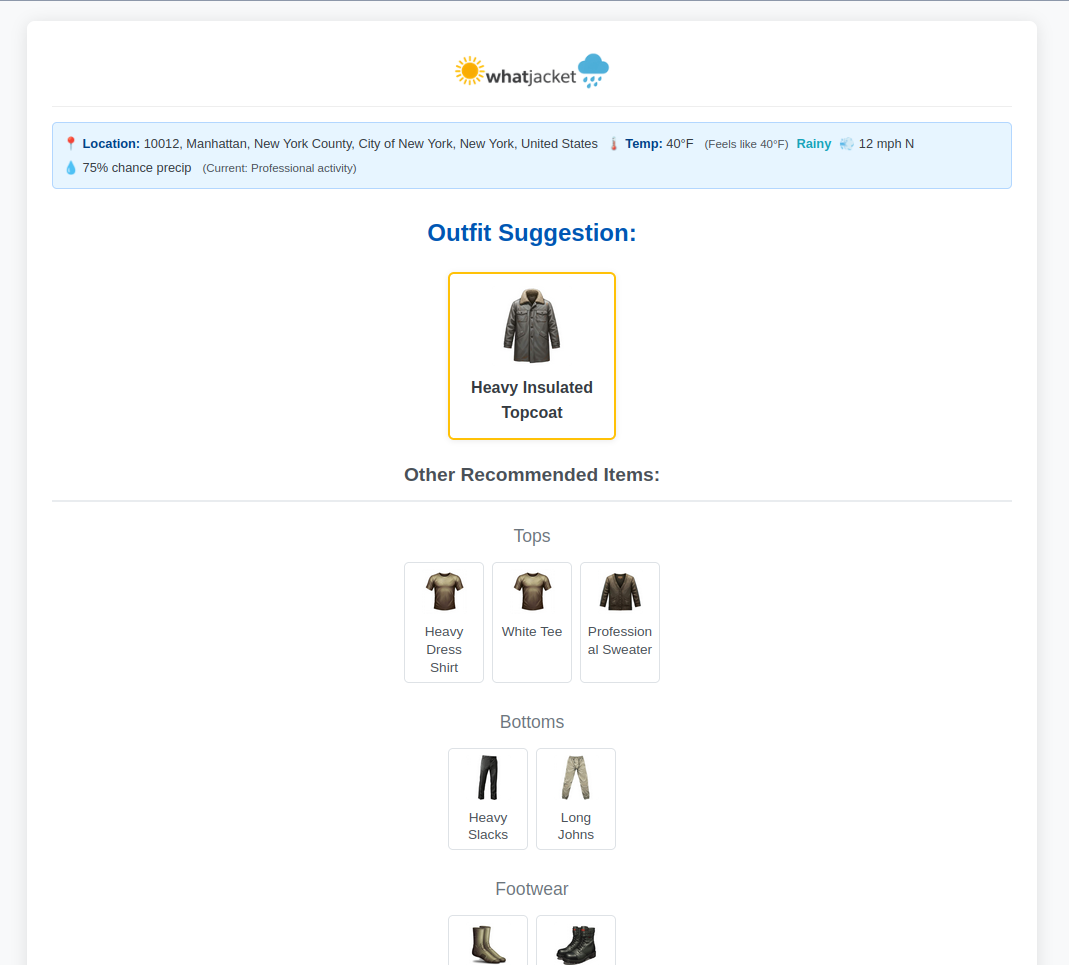
Features
- Fetches hourly forecast data for the immediate future from the NOAA/NWS API.
- Geocodes US ZIP codes to latitude/longitude using the Nominatim (OpenStreetMap) API.
Clothing Suggestion Logic
- Temperature Bands: Defined ranges (e.g., Hot, Mild, Cold, Frigid) based on current temperature.
- "Feels Like" Temperature: Displayed for user context.
- Weather Conditions: Identified using keywords (rain, snow, sunny, windy, severe, etc.) from the forecast text.
- Wind Speed: Used for flags and specific item logic (e.g., umbrella usability).
- Precipitation Probability: Used for selecting appropriate rain/snow gear.
- Selected Activity Category: Filters items suitable for Casual, Hiking, Professional, etc.
- Item Properties: Considers
thermal_value,water_resistance,wind_resistance,sun_protection,special_conditionsdefined for each clothing item. - Layered Outfit Suggestions: Selects a base layer, bottoms, footwear, and appropriate mid/outer layers and accessories based on conditions.
- Prioritization Logic: Favors condition-specific gear (raincoats in rain, windbreakers in wind) and thermally appropriate items. Includes specific logic (e.g., mandatory undershirt for Professional dress shirts).
User Interface
- Displays results with item images, current conditions summary, and forecast details.
- Features a dynamic background image based on the primary weather condition.
- Includes a Fahrenheit/Celsius toggle.
- Vertically stacked form elements for improved usability across devices.
- Automatically hides the main input form when results are displayed.
- Provides a "Change Activity" form on the results page for quick updates.
- Persistence: Remembers the last used ZIP code, activity category, and temperature unit using PHP sessions.
- Debug Tools: Includes separate pages (
clothing-debug.php,outfit-simulator.php) for inspecting clothing items and simulating outfit generation under various conditions.
Tech Stack / Ingredients
- Backend: PHP (7.4+ recommended)
- Frontend: HTML and CSS
- NOAA/NWS Weather API (api.weather.gov) for forecast data.
- Nominatim Geocoding API (nominatim.openstreetmap.org) for ZIP code lookup.
Data Sources & Terms
- Weather Data: Provided by the [NOAA/NWS API](https://www.weather.gov/documentation/services-web-api). Requires adherence to their Terms of Service, including the use of a valid User-Agent identifying your application and contact information (see
config.php). Failure to provide a valid User-Agent may result in your access being blocked. - Geocoding Data: Provided by [Nominatim](https://nominatim.org/) using [OpenStreetMap](https://www.openstreetmap.org/copyright) data. Requires attribution as per the [Nominatim Usage Policy](https://operations.osmfoundation.org/policies/nominatim/). This attribution is automatically included in the site footer.
This application attempts full compliance with the terms of service for both APIs.
Setup
- Clone or download this repository to your web server.
git clone https://github.com/timnetworks/whatJacket.git- Ensure your web server (e.g., Apache, Nginx) is configured to run PHP. The script uses
file_get_contentswith stream contexts for API calls, which typically requiresallow_url_fopen = Onin yourphp.ini. If this is disabled for security reasons, you might need to refactor API calls to use thephp-curlextension. - Place the project files (
index.php,functions.php,config.php,style.css,script.js,*.phpdebug pages,img/directory, etc.) in your web server's document root or a suitable subdirectory. - IMPORTANT: Open
config.phpand update theAPI_USER_AGENTconstant with your actual application name/version and contact information (email or website) as required by the NOAA API terms.
// Example - REPLACE WITH YOUR DETAILS:
define('API_USER_AGENT', 'MyWhatJacketFork/1.0 (myemail@example.com; https://mywebsite.com/whatjacket)');- Make sure the
img/directory structure exists (img/backgrounds/,img/icons/) and contains the image files referenced inconfig.php. Check file permissions if images are not loading. Create a default placeholder image atimg/placeholder.png. - Access the
index.phpfile via your web browser.
Configuration (`config.php`)
Most application settings are controlled within config.php:
API_USER_AGENT: Must be set correctly for NOAA API compliance.NOAA_API_BASE_URL,GEOCODING_API_BASE_URL: API endpoints.APP_VERSION,APP_TITLE,APP_NAME_SHORT,APP_URL: Basic application info.LOGO_IMAGE_PATH,OG_IMAGE_PATH: Paths to branding images.DEFAULT_TEMP_UNIT,DEFAULT_CATEGORY: User defaults.THEME_COLOR,BACKGROUND_COLOR: PWA theme settings.CATEGORIES: Defines available activity categories, their labels, and icons (text/emoji and image path).TEMP_BANDS: Defines temperature ranges (in C and F) and assigns a basetarget_thermal_score(used implicitly by selection logic).CONDITION_KEYWORDS: Keywords used to identify weather conditions from forecast text.CONDITION_THRESHOLDS: Values likeWINDY_THRESHOLD_MPH,RAIN_PROBABILITY_THRESHOLD,UMBRELLA_MAX_WIND_MPH.FOOTER_LINKS: Links displayed in the footer.FORECAST_BACKGROUNDS: Mapping of primary condition keys to background images.SIMPLE_CONDITION_DISPLAY: User-friendly names for primary weather conditions.TYPE_TO_DISPLAY_GROUP_MAP: Maps clothing item types to display sections (Tops, Bottoms, etc.).CLOTHING_ITEMS: The core database of clothing items.
Each item defines:
name,type,layer,category.temp_bands: Array of temperature bands where the item is suitable.thermal_value: Approximate warmth score (0=none, 4=very heavy). Used for sorting/prioritization.water_resistance,wind_resistance,insulation,breathability,sun_protection.special_conditions: Array of condition keys (e.g., 'rainy', 'windy') required or preferred for this item.img,img_fallback: Paths to image assets. Ensure these paths are correct relative toindex.php.
Debug Pages
clothing-debug.php: Displays a grid of all items defined inCLOTHING_ITEMS, showing their properties and checking the status (OK, Warning, Error) of their primary and fallback image files.outfit-simulator.php: Allows you to manually select a temperature band, activity category, and specific weather conditions (windy, rainy, sunny, etc.) to test the output of theselect_clothing()function and see the generated outfit. Includes the simulated forecast data used for the test.
Contributing
Pull requests are welcome. For major changes, please open an issue first to discuss what you would like to change.
License
This project is published under the [MIT License](https://opensource.org/licenses/MIT).
Acknowledgements
- Thanks to the NOAA/NWS and OpenStreetMap/Nominatim projects for providing the essential data APIs.
- Base code generation and refinement assisted by Google Gemini.